NetSuite
Prerequisites for Configuring NetSuite Data Source
Initial Setup
- Login into your NetSuite account
- Go to Setup » Company » Company Information
- Copy your Account ID (Realm)
- Production: Should look like
1234567 - Sandbox: Should look like
1234567_SB2
- Production: Should look like
Enable Required Features
- Go to Setup » Company » Enable Features
- Click on SuiteCloud tab
- In SuiteScript section, enable:
- CLIENT SUITESCRIPT
- SERVER SUITESCRIPT
- In Manage Authentication section, enable:
- TOKEN-BASED AUTHENTICATION
- In SuiteTalk section, enable:
- REST WEB SERVISES
- Save the changes
Create Integration
- Go to Setup » Integration » Manage Integrations » New
- Fill the Name field (recommended:
insightsiq-rest-integration) - Ensure State is enabled
- Enable Token-Based Authentication
- Save changes
- Copy the Consumer Key and Consumer Secret when shown
Setup Role
- Go to Setup » Users/Roles » Manage Roles » New
- Fill the Name field (recommended:
insightsiq-integration-role) - In Permissions tab, add the following with full or view access:
- (REQUIRED) All Transactions dropdown entities
- (REQUIRED) All Reports dropdown entities
- (REQUIRED) All Lists dropdown entities
- (REQUIRED) All Setup dropdown entities
Note: Edit these permissions when you rename or customize any Object in NetSuite for insightsiq-integration-role.
Setup User
- Go to Setup » Users/Roles » Manage Users
- Click on the target user's name
- Click Edit
- In Access tab, select the
insightsiq-integration-role - Save changes
Create Access Token
- Go to Setup » Users/Roles » Access Tokens » New
- Select:
- Application Name
- User (assigned with insightsiq-integration-role)
- Role (assigned to the user)
- Token Name (recommended:
insightsiq-rest-integration-token)
- Save changes
- Copy the Token ID and Token Secret when shown
Configuring NetSuite Data Source
- Select the Source Type as NetSuite
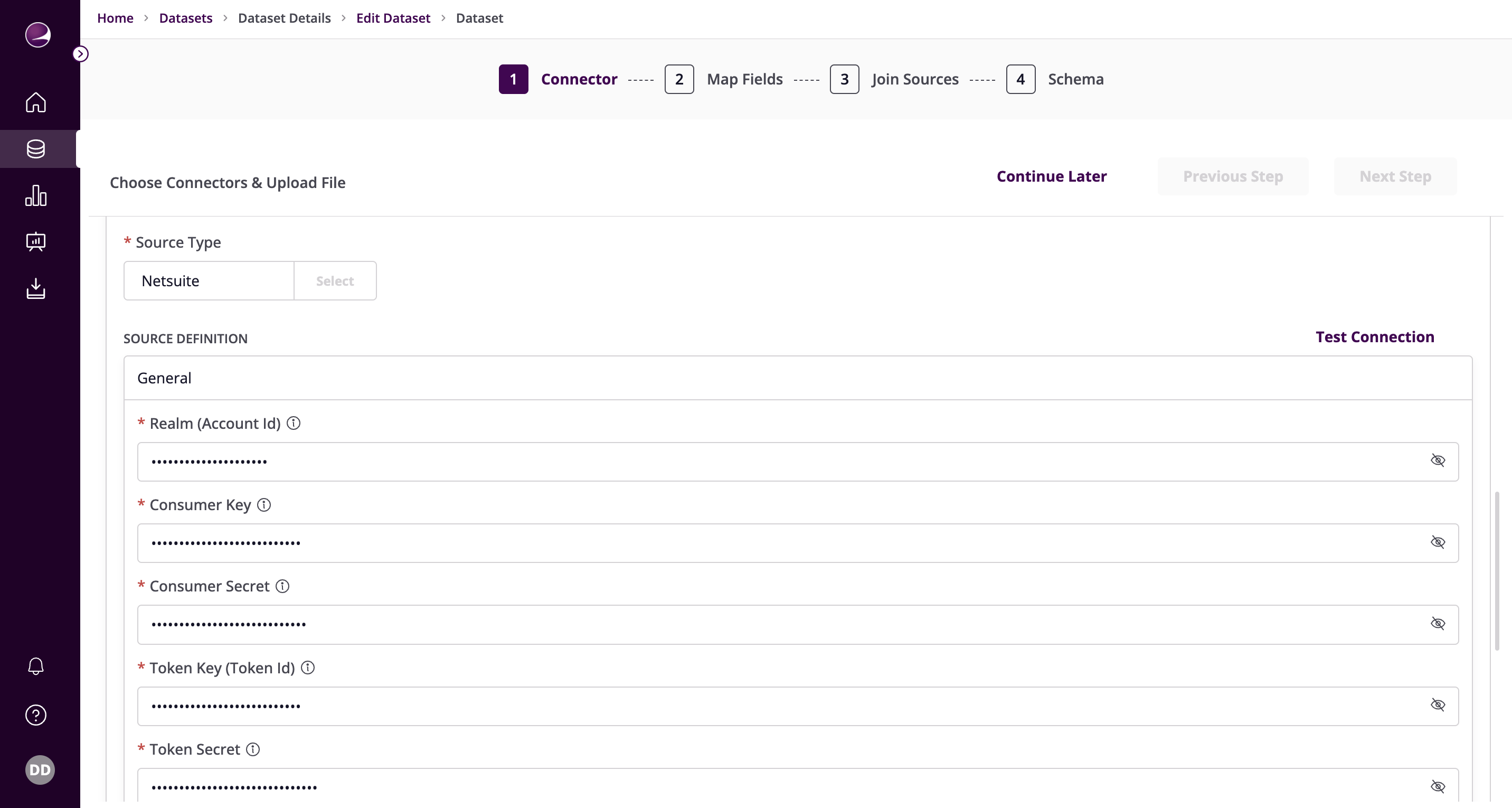
- Fill in the required details:
Realm (Account Id) - Enter the NetSuite realm
- Production Example:
2344535 - Sandbox Example:
2344535_SB1
- Production Example:
Consumer Key - Enter the Consumer key
Consumer Secret - Enter the Consumer Secret key
Token Key (Token Id) - Enter the Token ID
Token Secret - Enter the Token Secret
Object Types - Specify the API names of the NetSuite objects you want to sync
- Example:
customer, salesorder - Note: Setting this speeds up the connection setup process
- Example:
Start Date - Starting point for your data replication
- Format: "YYYY-MM-DDTHH:mm:ssZ"
- Example:
2017-01-25T00:00:00Z
Window in Days - The amount of days used to query the data with date chunks. Set smaller value if you have lots of data.
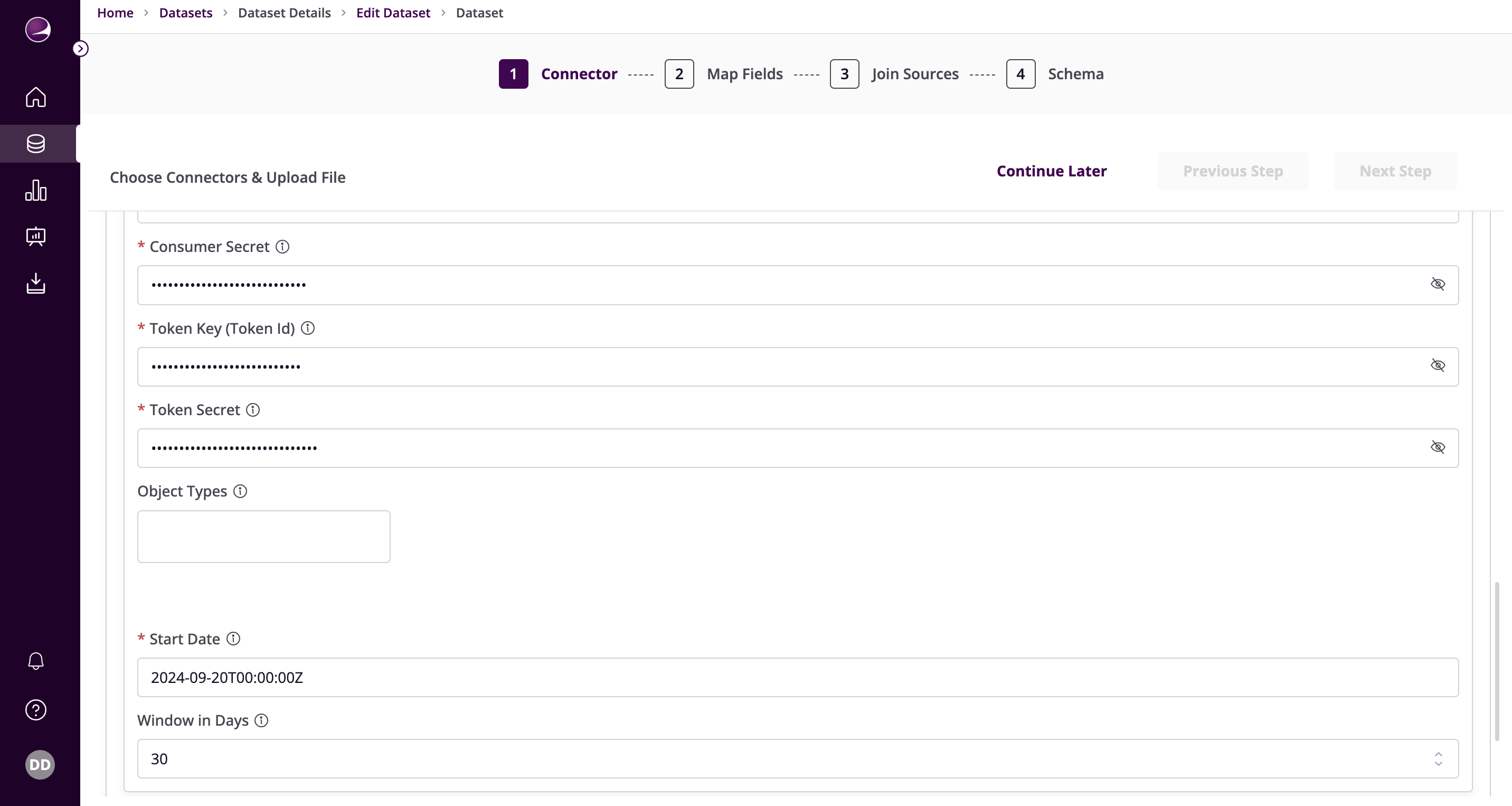
- Click on Test Connection to verify if the connection is established successfully.